CLO zFab Kit

Back to Guide
zFAB Scanner Results User Guide
This section illustrates how the fabric’s visual characteristics such as texture, pattern,
and transparency are represented in the CLO rendering environment based on the scan data.
- The appearance of colors may vary depending on the brightness and color temperature settings of the user’s monitor.
- Example: At higher brightness the fabric may appear lighter than it actually is, while a higher color temperature may give it a bluish tone.
- Actual fabric photos taken with mobile devices or cameras are not included, as such images cannot accurately reproduce the true material.
Diffuse
Normal
Roughness
Alpha
- The types of PBR Maps applied for each fabric are indicated below the results.
- These results are limited to texture quality and do not include physical property data.
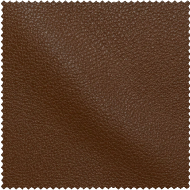
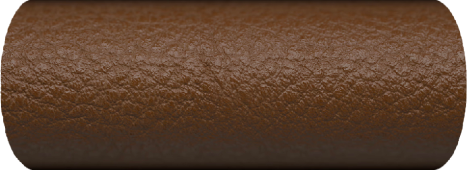
- Both Swatch View (Zoom-out) and Roll View (Zoom-in) results are provided.

CLO zFab Kit
Back to Guide
zFAB Scanner Results User Guide
This section illustrates how the fabric’s visual characteristics such as texture, pattern,
and transparency are represented in the CLO rendering environment based on the scan data.
- The appearance of colors may vary depending on the brightness and color temperature settings of the user’s monitor.
- Example: At higher brightness the fabric may appear lighter than it actually is, while a higher color temperature may give it a bluish tone.
- Actual fabric photos taken with mobile devices or cameras are not included, as such images cannot accurately reproduce the true material.
Diffuse
Normal
Roughness
Alpha
- The types of PBR Maps applied for each fabric are indicated below the results.
- These results are limited to texture quality and do not include physical property data.
- Both Swatch View (Zoom-out) and Roll View (Zoom-in) results are provided.
CLO zFab Kit
Back to Guide
zFAB Scanner Results User Guide
This section illustrates how the fabric’s visual characteristics such as texture, pattern,
and transparency are represented in the CLO rendering environment based on the scan data.
- The appearance of colors may vary depending on the brightness and color temperature settings of the user’s monitor.
- Example: At higher brightness the fabric may appear lighter than it actually is, while a higher color temperature may give it a bluish tone.
- Actual fabric photos taken with mobile devices or cameras are not included, as such images cannot accurately reproduce the true material.
Diffuse
Normal
Roughness
Alpha
- The types of PBR Maps applied for each fabric are indicated below the results.
- These results are limited to texture quality and do not include physical property data.
- Both Swatch View (Zoom-out) and Roll View (Zoom-in) results are provided.
CLO zFab Kit
Back to Guide
zFAB Scanner Results User Guide
This section illustrates how the fabric’s visual characteristics such as texture, pattern,
and transparency are represented in the CLO rendering environment based on the scan data.
- The appearance of colors may vary depending on the brightness and color temperature settings of the user’s monitor.
- Example: At higher brightness the fabric may appear lighter than it actually is, while a higher color temperature may give it a bluish tone.
- Actual fabric photos taken with mobile devices or cameras are not included, as such images cannot accurately reproduce the true material.
Diffuse
Normal
Roughness
Alpha
- The types of PBR Maps applied for each fabric are indicated below the results.
- These results are limited to texture quality and do not include physical property data.
- Both Swatch View (Zoom-out) and Roll View (Zoom-in) results are provided.